
Blog
How to Choose Commercial Access Control Systems in 2026?
Choosing Commercial Access Control Systems in 2026 requires more than comparing prices and card readers. A secure entrance should work smoothly at 7:30 a.m., during a staff change, and after a network interruption. It should also support contractors, visitors, deliveries, and emergency responders without creating confusion. Bruce Schneier, a respected security technologist, famously said, “Security is a process, not a product.” That principle remains highly relevant to modern access control decisions.
A practical evaluation should examine credential types, mobile access, biometric options, cloud management, video integration, and audit trails. Check how quickly administrators can revoke a lost badge. Test whether doors remain secure during a power or internet failure. Ask where system data is stored, who can access it, and how updates are managed. These details reveal more than a polished product demonstration.
Budget matters, but the cheapest system may become expensive after installation. Licensing fees, replacement readers, training, and software support can change the total cost significantly. Compatibility deserves equal attention. A new platform may not communicate well with existing locks, elevators, alarms, or visitor systems. That weakness is easy to miss.
There is no perfect solution for every building. A small office may need simple mobile credentials, while a research facility may require layered authentication and strict access zones. Reviewers should compare real workflows, not only technical specifications. The right Commercial Access Control Systems strategy balances security, usability, resilience, privacy, and future growth. It may still need refinement after deployment, because buildings and risks change.
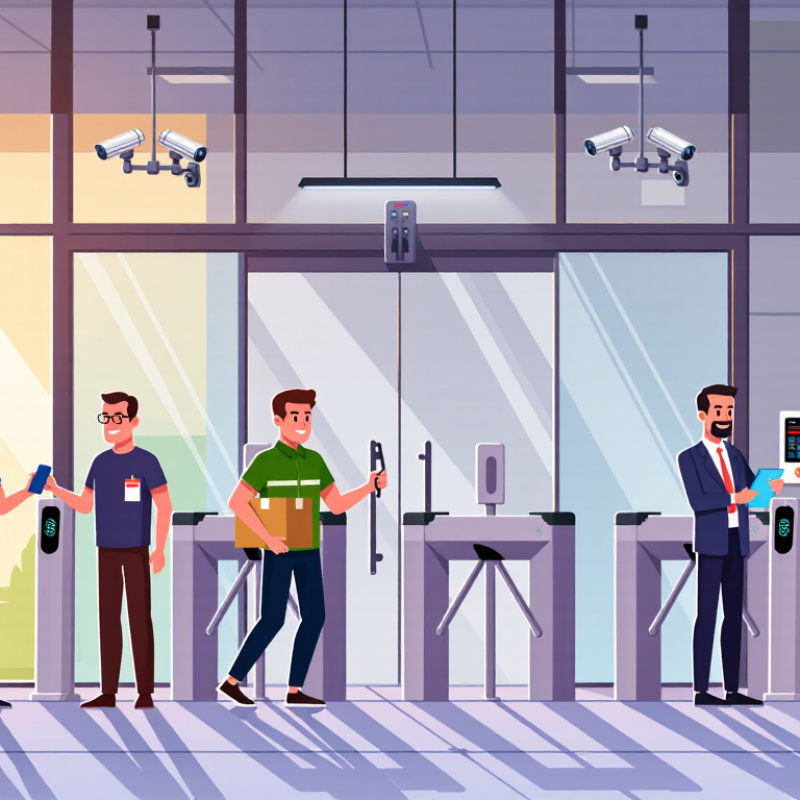
Table of Contents
[Hide]
Define Business Access Requirements and Security Objectives
How to Choose Commercial Access Control Systems in 2026?
Define Business Access Requirements and Security Objectives
Begin with people, places, and risk. List every entrance, server room, loading bay, and restricted cabinet. Record who needs access, during which hours, and for what task. A cleaner may need lobby access at 6 a.m., but not the finance archive. This sounds obvious. Many plans still miss temporary workers and emergency doors.
Set measurable security objectives before comparing equipment. You might require badge access for all staff areas, visitor escorting, and instant access removal after departure. The 2025 Data Breach Investigations Report analyzed 22,052 incidents and 12,195 confirmed breaches. Its findings reinforce one practical concern: compromised credentials can quickly expand a small weakness. Therefore, define identity verification, audit logging, and rapid credential suspension as separate requirements.
Physical security also affects financial exposure. The 2024 Cost of a Data Breach Report reported a global average breach cost of 4.88 million dollars. That figure does not justify buying every available feature. It supports disciplined risk mapping. Consider occupancy, operating hours, evacuation procedures, privacy expectations, and integration with existing systems. NIST guidance recommends stronger authentication for higher-risk access. Apply that principle to sensitive rooms, not every doorway automatically. I have seen teams overprotect the main entrance while ignoring shared back doors. That is an uncomfortable design failure. Review access logs monthly, test lost-card procedures, and question permissions that no longer match real work.
How to Choose Commercial Access Control Systems in 2026? - Define Business Access Requirements and Security Objectives
| Business Environment | Typical Users and Access Points | Primary Security Objective | Recommended Authentication Approach | Critical System Requirements | Suggested Performance Target | Priority Level |
|---|---|---|---|---|---|---|
| Small Office | 10–50 employees; 1–8 exterior doors; limited visitor traffic | Prevent unauthorized entry while keeping daily administration simple | Encrypted mobile credentials or access cards with unique user records | Central user management, door schedules, temporary credentials, basic event history, and battery or power alerts | Access events retained for at least 90 days; administrative changes logged | Moderate |
| Multi-Tenant Office Building | 100–1,000 users; 10–80 doors; multiple tenants and shared areas | Separate tenant permissions and maintain clear accountability for shared spaces | Role-based credentials with time-based permissions; visitor passes for defined periods | Tenant segregation, elevator or floor access, visitor management, audit trails, and centralized administration | Permission changes applied within 5 minutes; complete access records retained for 12 months | High |
| Warehouse and Distribution Facility | 50–500 employees, contractors, and drivers; 8–40 doors and gates | Control movement between public, operational, loading, and restricted zones | Cards or mobile credentials for employees; temporary credentials for contractors and drivers | Outdoor-rated readers, gate integration, anti-passback options, shift schedules, door-held-open alarms, and offline operation | Access decisions available during network interruption; alarm notifications delivered within 60 seconds | High |
| Healthcare Facility | 200–5,000 users; 20–200 doors; staff, patients, vendors, and emergency personnel | Protect sensitive areas without obstructing emergency access or clinical workflows | Role-based credentials with multi-factor authentication for administrators and high-risk areas | Detailed audit trails, emergency override procedures, privacy-conscious administration, visitor controls, and integration with identity systems | Security events retained according to organizational policy; emergency unlock procedures tested regularly | Critical |
| Education Campus | 500–10,000 users; 30–300 doors; students, staff, visitors, and service providers | Protect occupants, manage changing populations, and support rapid lockdown procedures | Identity-linked cards or mobile credentials with temporary visitor passes | Mass permission updates, lockdown integration, classroom schedules, visitor screening, and clear emergency reporting | Bulk access changes completed within 15 minutes; emergency procedures available when systems are offline | Critical |
| Manufacturing Plant | 100–2,000 users; 20–150 doors; production staff, contractors, and delivery personnel | Separate production, maintenance, hazardous, and administrative zones | Credential-based access with stronger authentication for control rooms and hazardous areas | Shift-based schedules, zone permissions, safety interlocks where appropriate, tamper monitoring, and industrial environmental protection | Access policies synchronized before each shift; critical alarms acknowledged within 5 minutes | Critical |
| Financial Services Office | 50–1,000 users; 10–100 doors; employees, clients, custodians, and vendors | Protect financial information, restricted work areas, and evidence-quality records | Multi-factor authentication for privileged users and sensitive areas; individually assigned credentials | Strong encryption, least-privilege roles, tamper-evident audit records, separation of duties, and rapid credential revocation | Privileged access reviewed at least quarterly; terminated-user credentials disabled promptly | Critical |
| Data Center | 20–500 authorized users; 5–50 doors; employees, technicians, and approved visitors | Prevent unauthorized physical access to computing infrastructure and maintain chain of custody | Multi-factor authentication, often combining a credential with a biometric or PIN where legally and operationally appropriate | Mantrap or two-door control, anti-tailgating measures, video verification, redundant power, offline operation, and detailed logging | Redundant power for access equipment; security logs synchronized and protected from unauthorized alteration | Critical |
| Construction or Temporary Site | 20–300 workers; 1–20 gates or doors; frequently changing contractors | Secure the perimeter and quickly remove access when assignments end | Mobile or card credentials with automatic expiration and contractor-specific schedules | Weather-resistant devices, rapid enrollment, remote administration, gate control, lost-credential replacement, and activity reports | Temporary credentials expire automatically; lost credentials can be revoked remotely within minutes | High |
| Retail or Public-Facing Business | 20–500 employees; 2–30 doors; staff, vendors, customers, and service personnel | Keep customer areas accessible while restricting stockrooms, offices, and cash-handling areas | Employee credentials with role- and schedule-based permissions; temporary vendor access | Simple administration, door schedules, alarm integration, audit reports, and easy credential replacement | Staff access aligned with scheduled shifts; sensitive-area events reviewed regularly | High |
Planning basis: Define the number of users, doors, locations, access zones, visitor types, operating hours, compliance obligations, emergency procedures, network availability, and required retention period before selecting a commercial access control system.
Related Posts
-
China Top 10 Access Control Systems Manufacturers?
-

Exploring the Best Commercial Access Control Systems: A Comprehensive Comparison Guide
-
Global Reach of China's Leading Door Access Control Systems: Setting the Standard Worldwide
-
Evaluating Card Access Control Systems for Enhanced Security Efficiency and Cost Effectiveness
-
2026 How to Choose the Best Door Access Control Systems?
-
What is Door Access Control Systems and How They Work?