
Why Choose an Industrial Panel Pc for Your Business?
Choosing an Industrial Panel Pc is not simply a screen upgrade. It is a decision about uptime, operator safety, and long-term maintenance. In a packaging line, workers may use the display with gloved hands while dust, vibration, and temperature changes surround the machine. A commercial computer can struggle in that environment. An Industrial Panel Pc is designed for continuous operation, sealed front panels, wide temperature ranges, and industrial communication networks.
Industry experience supports this approach. Advantech founder K. C. Liu once stated, “The value of industrial computing is measured by its reliability in real-world applications.” That principle matters on a factory floor. A bright display is useful, but stable performance matters more. Touch accuracy, fanless cooling, stainless-steel housing, and easy panel mounting can reduce interruptions. They also help technicians inspect alarms without opening a separate cabinet.
Still, an Industrial Panel Pc is not a universal answer. Some facilities need stronger cybersecurity, remote management, or a larger control architecture. Others may select a model with excessive processing power and waste budget. That mistake is common. The right choice depends on workload, IP rating, screen size, operating system, and available support. Ask practical questions. Can operators read the screen under harsh lighting? Can the unit survive washdown procedures? Can replacement parts arrive quickly?
The best investment is not always the most expensive model. It is the one that remains dependable when production pressure rises. Careful evaluation creates measurable value, although no device removes every operational risk.
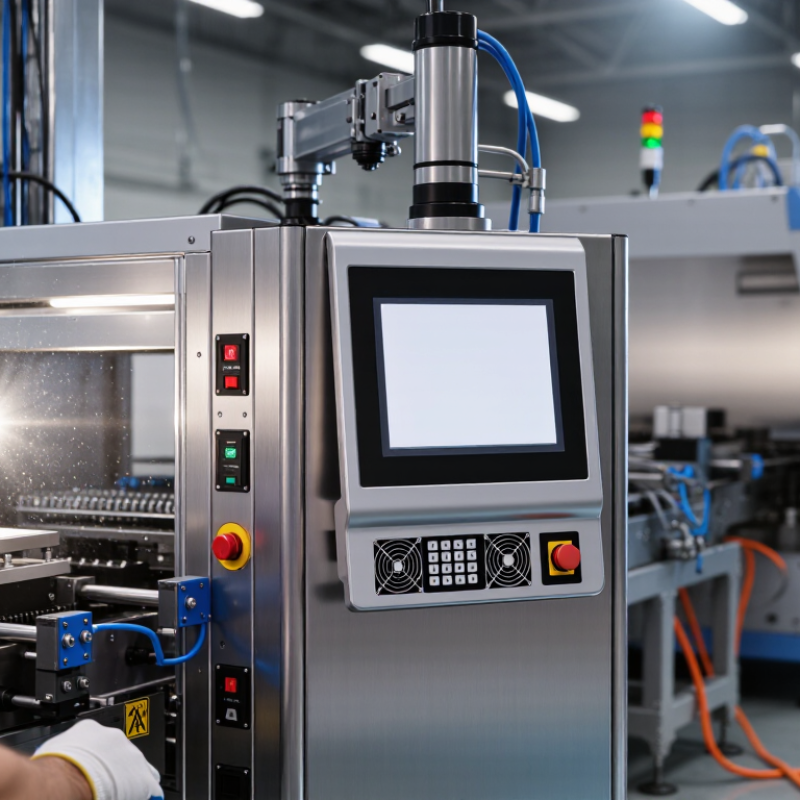
An industrial panel PC combines a computer, display, and touchscreen in one sealed enclosure. It is designed for factory floors, control rooms, warehouses, and outdoor equipment. Unlike a standard office computer, it can support continuous operation, vibration, dust, humidity, and wider temperature changes. Many models use fanless cooling, solid-state storage, and front panels rated to IP65 under IEC 60529. However, protection levels vary by design and installation.
The difference becomes clearer in daily work. A standard computer often depends on fans, loose cables, and office peripherals. An industrial panel PC mounts directly into a cabinet or machine interface. Its screen remains visible beside motors, conveyors, and bright production lights.
It may also provide serial, Ethernet, USB, and industrial communication ports. IoT Analytics reported 16.6 billion connected IoT devices worldwide in 2023. That growth increases the need for reliable local visualization and data handling.
The business case is not automatic. A panel PC can be excessive for simple administrative tasks. For production environments, the calculation changes. Deloitte’s 2023 Smart Manufacturing and Operations Survey found that 86% of manufacturing leaders viewed smart manufacturing as a major competitiveness driver. A suitable panel PC can reduce separate components and simplify maintenance. Still, sunlight, chemical exposure, temperature, and software compatibility require careful testing. One missed detail can turn a rugged computer into an expensive mistake.
Industrial panel PCs fit business environments where ordinary computers fail quickly. They serve factory floors, warehouses, utilities, transport hubs, and food-processing areas. These sites often face dust, vibration, moisture, temperature changes, and constant operator contact. A sealed touchscreen can reduce exposed cables and simplify cleaning. Glove-friendly controls also help workers respond beside machines, conveyors, or loading bays.
The 2024 Smart Manufacturing and Operations Survey found that 86% of surveyed leaders expect smart manufacturing to become a major competitiveness factor within five years. That finding supports local, real-time control. Industrial panel PCs can display production data, alarms, maintenance instructions, and inventory movement in one rugged station. In outdoor utilities, sunlight-readable screens and wide-temperature designs matter more than stylish appearance. In refrigerated operations, condensation resistance becomes essential. Not every application needs the highest specification.
Tips: Match the enclosure rating to real exposure, not marketing claims. Check IP protection, operating temperature, screen brightness, glove response, mounting depth, and long-term parts availability. Test the unit with actual gloves and cleaning chemicals. This small trial often reveals uncomfortable compromises.
The strongest use cases are places where downtime is expensive and information must stay visible. Manufacturing sites gain from machine-side monitoring. Warehouses benefit from fixed scanning and dispatch stations. Energy and water facilities need dependable interfaces near pumps and control panels. However, panel PCs are not automatically better. Poor software design, glare, or weak network planning can still slow operators. Reliability begins with the whole workstation, not the screen alone.
An industrial panel PC supports reliable operations where dust, vibration, heat, and constant shifts challenge ordinary office computers. Its sealed enclosure limits contamination, while a fanless design removes a common mechanical failure point. Wide-temperature components keep screens and processors stable near furnaces or cold loading bays. A readable display matters too. Operators should see alarms through glare, gloves, and protective eyewear. Uptime Institute’s 2024 Annual Outage Analysis found that 54% of respondents reported their latest outage cost over $100,000. Downtime is expensive. This figure makes preventive hardware easier to justify, although it does not prove that one computer prevents failure.
Look for industrial I/O, storage with power-loss protection, secure boot, and replaceable parts with documented lifecycles. These details support traceability when a sensor stops responding at 2 a.m. NIST SP 800-82 Rev. 3 recommends protecting operational technology through segmentation, least functionality, and controlled remote access. A panel PC should fit that architecture, not bypass it. IP-rated protection must match the actual washdown and dust environment. A high rating cannot compensate for poor cable glands or grounding. In practice, technicians also need clear diagnostics and spare units nearby. That lesson is less glamorous. Yet it often decides recovery speed. Before purchase, test touch accuracy with gloves, boot behavior after power loss, and visibility under the site’s real lighting.
Key features that support reliable industrial operations
Industrial Panel PCs are designed for continuous operation in demanding environments. Fanless cooling reduces moving-part failure risks, IP65-rated front panels help protect against dust and water jets, wide-temperature designs support deployment in harsher areas, and 24/7 operation enables uninterrupted monitoring and control.
Why Choose an Industrial Panel PC for Your Business?
Industrial panel PCs bring control, visualization, and data access into one rugged workstation. Operators can view production speed, temperature, alarms, and quality records without leaving the line. Gloved hands need large controls. Bright displays matter near windows. Fanless designs can reduce dust-related maintenance in harsh areas.
The International Data Corporation’s Data Age 2025 report projected global data creation would reach 175 zettabytes by 2025. That volume makes delayed information expensive. A panel PC can connect sensors, supervisory control systems, and manufacturing databases at the workstation. Operators gain faster access to live trends and historical records. They can spot abnormal vibration before a small fault becomes downtime. Better visibility supports quicker decisions, not automatic perfection.
The World Economic Forum’s 2023 Global Lighthouse Network report described productivity improvements of up to 30% at advanced industrial sites. A panel PC can support similar practices through digital work instructions, real-time dashboards, and electronic maintenance logs. However, hardware alone cannot create efficiency. Poor network design remains a weakness. Unclear screen layouts slow people down. Cybersecurity, backup procedures, and long-term spare planning also require attention. A practical evaluation should measure response time, data accuracy, cleaning conditions, and operator training before installation.
Why Choose an Industrial Panel PC for Your Business?
Selecting an industrial panel PC requires more than comparing processor speed and screen size. IDC’s Worldwide Edge Spending Guide forecasts global edge-computing spending will reach $317 billion by 2026. That growth reflects stronger demand for local data processing in factories, warehouses, and utilities. IFR’s World Robotics 2024 report recorded 541,302 industrial robots installed worldwide in 2023. Each connected system needs a dependable human-machine interface. Your selection should match the environment, not merely the application.
Start with temperature, dust, moisture, vibration, and sunlight exposure. An IP65-rated front panel may resist dust and water jets, but the complete installation still needs review. IEC 60529 defines enclosure protection ratings, not overall system reliability. Bright production floors need high-luminance displays. Gloved operators may need projected-capacitive or resistive touch technology. Check viewing angles, cleaning chemicals, mounting space, and cable access. Fanless designs can reduce dust intake, although passive cooling may limit peak performance. Do not overlook it.
Compute requirements should cover current software and future updates. Confirm operating-system support, storage endurance, network protocols, and cybersecurity controls. NIST SP 800-82 Rev. 3 recommends risk-based protection for operational technology environments. Lifecycle support matters too. A low purchase price can become expensive when replacements interrupt production. In practice, specification sheets can mislead. Test a sample beside the actual machine, with real gloves, lighting, vibration, and cleaning routines. This imperfect step often reveals usability problems before installation.
| Selection Dimension | Typical Industrial Panel PC Data | Why It Matters to the Business | Recommended Evaluation Point |
|---|---|---|---|
| Display Size | 10.1–24 inches; common resolutions include 1280 × 800, 1366 × 768, and 1920 × 1080 pixels. | A larger display can improve visibility of dashboards, alarms, process diagrams, and production data. | Match the screen size and resolution to operator viewing distance, available panel space, and application layout. |
| Touch Technology | Projected capacitive touch, resistive touch, or non-touch display; many systems support glove or stylus operation when specified. | The correct touch method supports reliable operation in clean rooms, workshops, outdoor areas, or environments where gloves are used. | Confirm glove compatibility, wet-finger performance, chemical resistance, and the required number of touch points. |
| Operating Temperature | Industrial models commonly offer ranges such as -20°C to 60°C or 0°C to 50°C, depending on the configuration. | A suitable temperature range helps reduce unexpected shutdowns and performance degradation. | Calculate the actual ambient temperature inside the enclosure, including heat generated by the computer and nearby equipment. |
| Ingress Protection | Front-panel ratings commonly range from IP65 to IP69K; the exact rating depends on the enclosure and installation method. | Protection against dust and water supports dependable operation in manufacturing, food processing, and washdown areas. | Select the rating according to dust exposure, water pressure, cleaning chemicals, and whether the rear of the unit is protected. |
| Processor Performance | Configurations may use low-power processors for HMI tasks or higher-performance multi-core processors for machine vision, analytics, and virtualization. | Adequate processing capacity improves response time and allows the system to run required software without excessive hardware upgrades. | Define the number of applications, data-processing workload, connected devices, and expected service life before choosing the CPU. |
| Memory and Storage | Typical configurations range from 4–32 GB RAM and 64 GB–1 TB solid-state storage, depending on workload and operating system. | Sufficient memory and solid-state storage support faster startup, application stability, local data logging, and reduced sensitivity to vibration. | Estimate software requirements, log retention, database size, backup needs, and future expansion. |
| Industrial Connectivity | Common interfaces include Gigabit Ethernet, USB, serial ports such as RS-232/422/485, digital I/O, and display outputs. | Direct connectivity can simplify integration with PLCs, sensors, scanners, drives, cameras, and factory networks. | List every current and planned device, protocol, connector type, cable length, and network redundancy requirement. |
| Mounting Method | Panel mount, VESA mount, wall mount, arm mount, and rack-related installation options are commonly available. | A suitable mounting method improves ergonomics, cable management, service access, and protection against accidental impact. | Check cutout dimensions, mounting depth, weight limits, viewing angle, and access to serviceable components. |
| Power Input | Typical industrial DC inputs include 9–36 VDC or 12–24 VDC; some systems use AC input through an external or integrated power supply. | Compatible power input helps prevent downtime caused by voltage mismatch or unstable electrical conditions. | Verify nominal voltage, allowable fluctuation, surge protection, grounding, power consumption, and backup-power requirements. |
| Cooling Design | Fanless designs use passive heat dissipation; fan-cooled designs may provide greater thermal capacity for high-performance processors. | Fanless construction can reduce moving-part failure, dust intake, and maintenance, while active cooling may support heavier workloads. | Balance workload, ambient temperature, dust level, acoustic requirements, and maintenance access. |
| Vibration and Shock | Industrial specifications may state vibration resistance in frequency and acceleration ranges, and shock resistance in peak acceleration values. | Appropriate mechanical resistance helps protect the system in vehicles, production lines, machine tools, and heavy equipment areas. | Compare test conditions with actual site vibration, mounting rigidity, transportation requirements, and nearby machinery. |
| Operating System and Software | Systems may support embedded, desktop, or real-time operating environments, subject to hardware driver compatibility. | Software compatibility affects commissioning time, cybersecurity management, application support, and employee training. | Confirm operating-system lifecycle, required drivers, remote-management tools, licensing, and cybersecurity policies. |
| Lifecycle and Serviceability | Industrial equipment is often selected for long-term availability, stable hardware revisions, replaceable storage, and accessible service parts. | A longer support period can reduce redesign costs and simplify maintenance across multiple production sites. | Review availability commitments, spare-part strategy, warranty terms, repair procedures, and remote technical support. |
| Compliance and Testing | Depending on the market and application, relevant requirements may include electromagnetic compatibility, electrical safety, environmental testing, and hazardous-area certification. | Documented compliance reduces project risk and supports approval for installation in regulated or safety-sensitive environments. | Identify applicable local regulations, site standards, test reports, certificates, and installation restrictions before purchase. |
Note: The specifications shown are common selection ranges and should be verified against the exact product configuration, installation conditions, and application requirements.
By continuing to use the site, you agree to the use of cookies. more information
The cookie settings on this website are set to "allow cookies" to give you the best browsing experience possible. If you continue to use this website without changing your cookie settings or you click "Accept" below then you are consenting to this.